Developer Guide: Building & Testing
Developer guide for imgcompress: build and test locally with the Makefile, run unit, integration, E2E, and feature-flag tests, set up the VS Code Dev Container, and simulate the full CI pipeline before pushing your changes.
This guide covers how to run tests and builds locally so your contributions pass the same checks as CI. The Makefile is the canonical entry point for every common task. It also shows how to simulate the GitHub Actions pipeline exactly before you push.
1. VS Code Dev Container#
The easiest way to get a consistent dev environment is the VS Code Dev Container. It gives you a pre-configured Docker environment with all dependencies and extensions already installed.
How to use#
- Open the project in VS Code.
- Install the Dev Containers extension.
- Click "Reopen in Container" when prompted (or run
Dev Containers: Reopen in Containerfrom the command palette).
What you get#
- Pre-installed tools: Python 3.10+, Node.js, pnpm, and Docker CLI
- Extensions: Python, Docker, ESLint, Playwright, and more
- Port forwarding: port
3001(app) and5000(backend) are forwarded automatically - Docker-in-Docker: you can build and run containers inside the dev container, which is required for integration and E2E tests
2. Make Targets (canonical entry point)#
All everyday dev tasks run through the Makefile at the repo root. Helper scripts live under ./scripts/ and the Makefile wires them up so you don't have to remember paths or flags.
Starting with the v0.7.0 release, imgcompress builds on top of Docker Hardened Images (DHI) for a reduced OS attack surface and strict non-root runtime. DHI base images are pulled from a private registry on Docker Hub, so before running any make target that builds an image (build, build-local, scan, deploy-local, deploy-local-dev-mode, simci) you need to be logged in:
bashdocker login
Use a Docker Hub account that has access to the hardened image repository. If you skip this step the build will fail with an unauthorized pull error on the base image.
| Target | What it does |
|---|---|
make lint | Runs the Python linter (auto-runs before every other target). |
make unit | Runs backend unit tests. |
make integration | Runs backend integration tests (needs Docker). |
make e2e | Runs the Playwright end-to-end suite. |
make feature-flags | Runs the feature-flag matrix E2E suite. |
make build | Multi-arch (linux/amd64,linux/arm64) image build with SBOM and provenance attestations. Used for release validation. |
make build-local | Single-platform build loaded into your local Docker daemon. Used by scan and local testing. |
make scan (alias: make trivy) | Builds locally and runs a Trivy image scan. |
make deploy-local | Recommended for local development. Builds and runs the full production-style stack on your machine via Docker. |
make deploy-local-dev-mode | Same as deploy-local, but starts the container with DEV_MODE=true, which shows the in-app dev panel for triggering synthetic errors. |
make simci | Simulates the full GitHub Actions CI pipeline locally: builds the devcontainer, runs lint + tests inside it, builds the app image, and runs E2E. If this passes, CI passes. |
Common overrides#
The Makefile exposes a few variables you can override on the command line:
bashmake build IMAGE=imgcompress TAG=my-test make scan REGISTRY=docker.io/karimz1 make build-local LOCAL_PLATFORM=linux/arm64
3. Local Development#
Recommended: full stack via make deploy-local#
For working on the app end-to-end (frontend + backend, exactly as users see it), use:
bashmake deploy-local
This builds the image with build-local and runs it through ./scripts/runLocalDockerBuildTester.sh, so what you see locally matches the published image. You can pass the same environment overrides the script accepts:
bashPORT_HOST=8080 \ DISABLE_LOGO=false \ DISABLE_STORAGE_MANAGEMENT=true \ make deploy-local
Once running, open http://localhost:8080 (or whatever PORT_HOST you set, default 80).
The Docker path bundles the built frontend assets into the image and runs the production server, so route behaviour, static-asset serving, and runtime config all behave the same as in production. The raw split-process scripts below skip that bundling step and require everything to be set up just right.
Dev mode (synthetic error triggers)#
make deploy-local-dev-mode starts the container with DEV_MODE=true. When this flag is on, an amber DEV pill appears in the top-left of the UI. Clicking it opens a Developer Tools panel with four buttons used to verify error rendering paths:
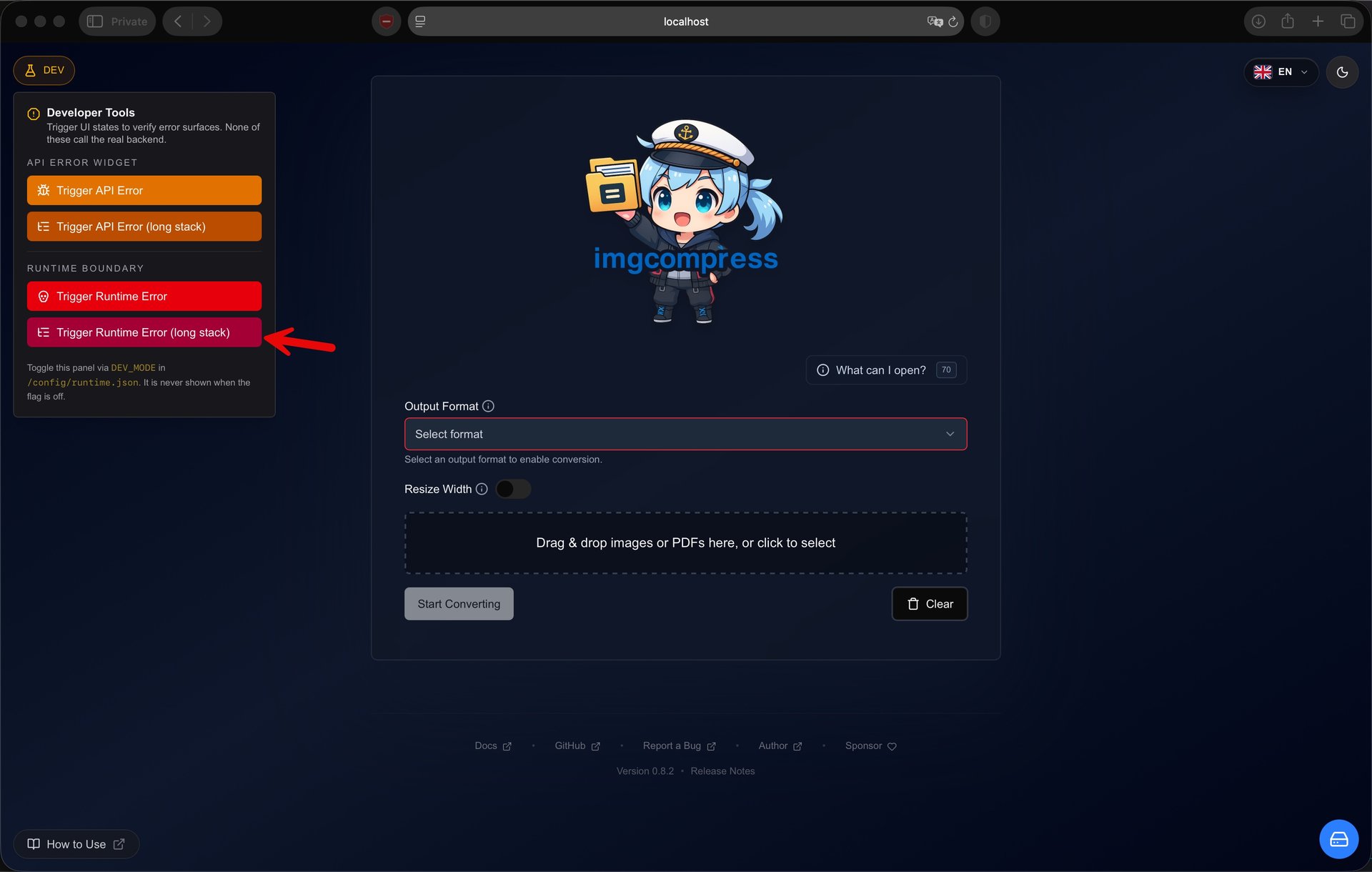 Developer Tools panel with synthetic error triggers, shown when DEV_MODE is on
- Trigger API Error / Trigger API Error (long stack) — render a synthetic API failure through the API error widget, with either a short message or a one-page traceback.
- Trigger Runtime Error / Trigger Runtime Error (long stack) — throw inside the React tree to verify the global error boundary, with either a short message or a one-page traceback.
Clicking a runtime trigger takes you to the global error boundary screen so you can verify scroll behaviour, wrap-on-long-paths, the diagnostics download, and the "Try Again" recovery path:
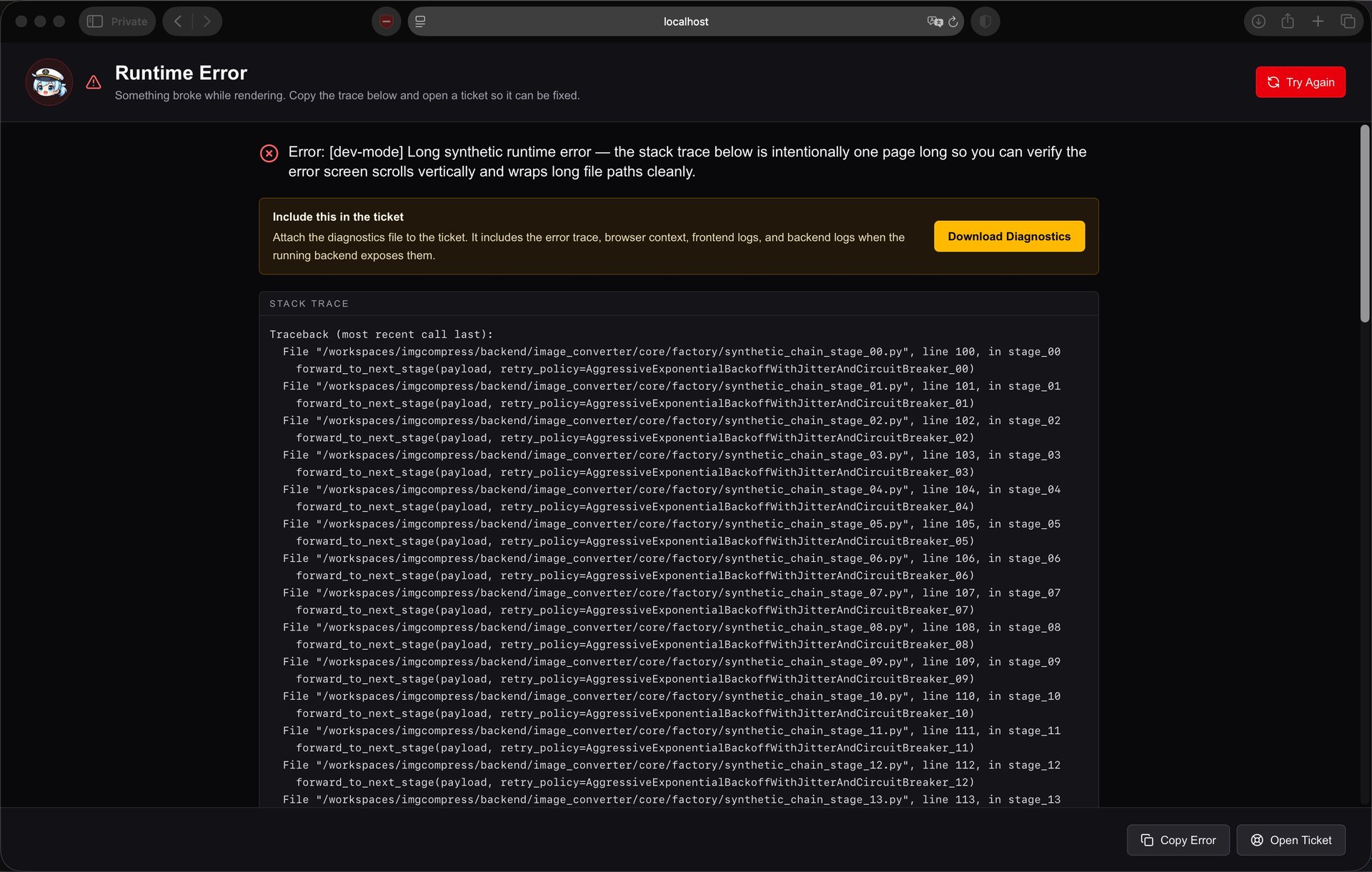 Runtime Error boundary screen with a one-page synthetic stack trace
You can also pass the env var manually instead of going through Make:
bashDEV_MODE=true ./scripts/runLocalDockerBuildTester.sh
Dev mode is off by default. The published image does not enable it on its own, but the flag is a plain env var, so anyone self-hosting can opt in by setting DEV_MODE=true on their docker run command or in their docker-compose.yml. It is intended for development and error-rendering verification, not for end-user features.
Advanced: raw split-process scripts#
If you want hot-reload on the frontend while iterating, you can run the backend and frontend as separate processes. This path needs your local Python venv and Node toolchain to be ready, and is more brittle than make deploy-local.
Prerequisites:
- Python 3.10+ with the project installed in a venv (
pip install -e ".[dev]") - Node.js & pnpm for the frontend
- Docker for integration tests
Run each in its own terminal from the repo root:
- Backend:
./scripts/runStartLocalBackend.sh - Frontend:
./scripts/runStartLocalFrontend.sh - E2E (optional):
./scripts/run-e2e.sh
The split-process flow doesn't bundle the frontend into the backend the way the production image does, so some scenarios (static asset routing, runtime config injection) won't match what users see. If you hit unexpected behaviour, switch to make deploy-local to confirm whether the issue reproduces against the production-style stack.
Targeted test runs#
You can run any test suite directly through Make without standing up the app:
bashmake unit # backend unit tests make integration # backend integration tests make e2e # Playwright E2E make feature-flags # feature-flag matrix E2E
See the Playwright E2E Testing Guide for debugging tips, targeted runs, and reports.
4. CI Simulation#
Recommended: make simci#
bashmake simci
This is the one command that mirrors the full GitHub Actions pipeline end-to-end: builds the devcontainer, runs lint and tests inside it, builds the app image, and runs E2E against it. If this passes locally, CI will pass.
Manual fallback (debugging only)#
If you need to debug a single CI step in isolation (for example, to repro a failing unit-test run inside the devcontainer image), you can invoke the underlying Docker commands directly. Prefer make simci for normal use.
Show manual Docker commands
Build the Dev Container
bashdocker buildx build -t devcontainer:local-test .devcontainer/
Backend Unit Tests
bashdocker run --rm \ --entrypoint /bin/sh \ -v /var/run/docker.sock:/var/run/docker.sock \ -v "$(pwd):/app/" \ -e IS_RUNNING_IN_GITHUB_ACTIONS=true \ --name devcontainer \ devcontainer:local-test /app/scripts/runUnitTests.sh
Backend Integration Tests
bashdocker run --rm \ --entrypoint /bin/sh \ -v /var/run/docker.sock:/var/run/docker.sock \ -v "$(pwd):/app/" \ -e IS_RUNNING_IN_GITHUB_ACTIONS=true \ --name devcontainer \ devcontainer:local-test /app/scripts/runIntegrationTests.sh
End-to-End (E2E) Tests
-
Build the ImgCompress image:
bashdocker buildx build -t karimz1/imgcompress:local-test . -
Start the app:
bashdocker run --rm -d \ --network host \ --name app \ karimz1/imgcompress:local-test web -
Run E2E:
bashdocker run --rm \ --entrypoint /bin/sh \ --network host \ -v /var/run/docker.sock:/var/run/docker.sock \ -v "$(pwd):/app/" \ -e IS_RUNNING_IN_GITHUB_ACTIONS=true \ -e PLAYWRIGHT_BASE_URL=http://localhost:5000 \ --name devcontainer_e2e \ devcontainer:local-test -c "/app/scripts/run-e2e.sh"
Common issue: broken pnpm lockfile after Dependabot merge#
Dependabot PRs that touch dependencies can leave a corrupted pnpm-lock.yaml when multiple lockfile changes are merged without a rebase.
Symptoms#
You may see an error like:
bashbroken lockfile at /workspaces/imgcompress/frontend: The lockfile at "/workspaces/imgcompress/frontend/pnpm-lock.yaml" is broken: duplicated mapping key (1307:3)
This means the lockfile has invalid YAML, usually from duplicated dependency entries.
Root cause#
Multiple Dependabot lockfile edits merged together without rebasing. pnpm validates YAML structure and fails immediately on duplicates.
Fix#
The fastest path is to ask imgcompress-chan, the repo's helper bot, to handle it for you. Drop a comment on the affected PR with /chan-fix somewhere in it. She loves a polite ask:
Hey chan, can you
/chan-fixit please? 💛
She'll refresh the branch from main, regenerate frontend/pnpm-lock.yaml with the pinned pnpm version, and push the repair commit so CI re-runs. Full details, allowed users, and the manual fallback live on her page: imgcompress-chan.
Prevent it next time#
Rebase Dependabot PRs that modify pnpm-lock.yaml before merging, and let CI run pnpm install on the branch to catch issues early.
Stuck on a step? Contact Support